
A school admissions page works best as a short hub with focused sub-pages, not one long scroll. Here is what belongs on the main page, which sub-pages earn their place, and how the enquiry form should reach your admissions office. Written for principals, admissions teams and web committees.
Admissions is usually the busiest section of a school website, and often the messiest. Over a few years it collects a process page, an old fee PDF, a circular and a form link, and parents are left unsure where to start.
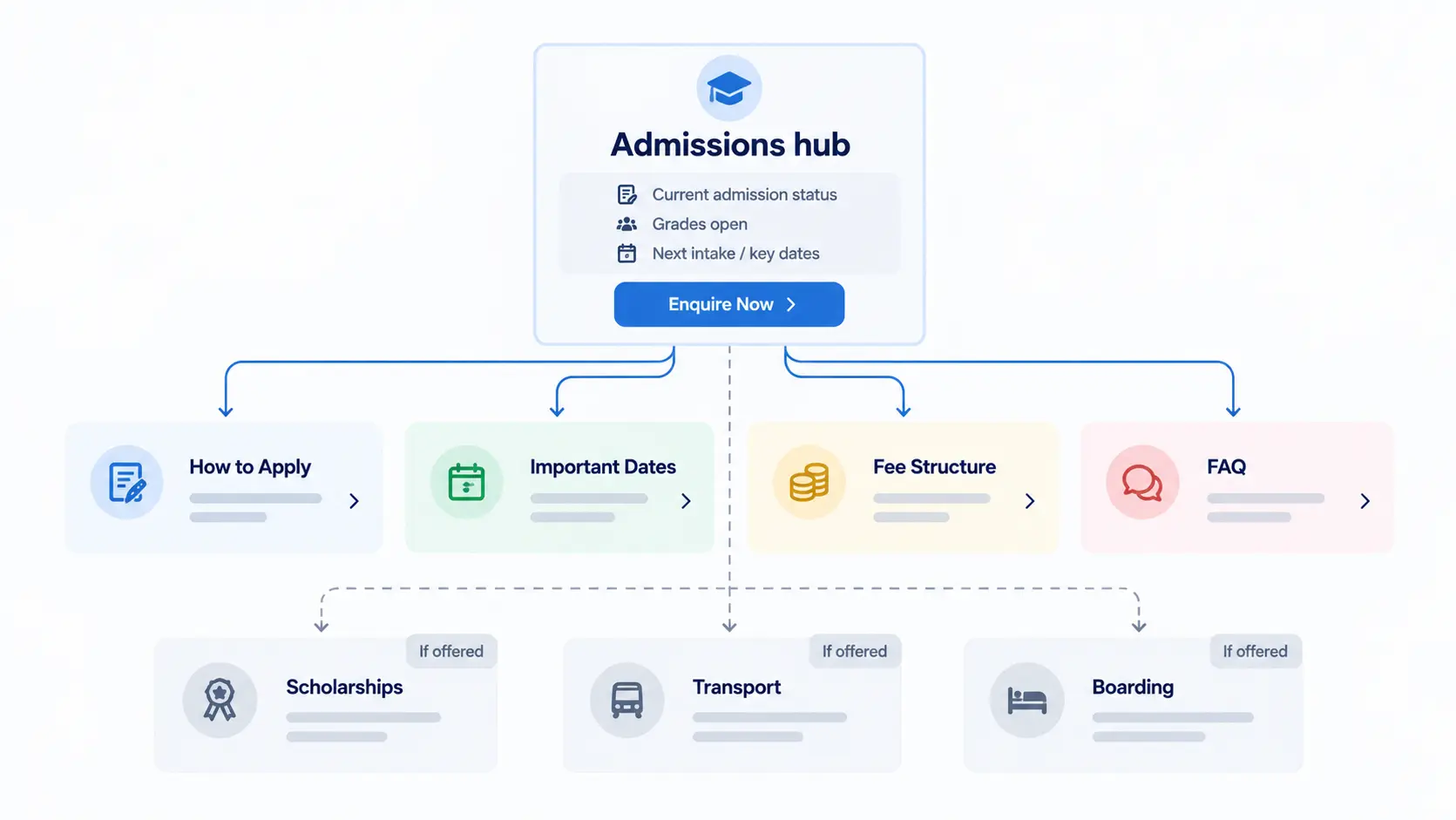
The hub tells a parent which grades are open, what the process looks like in a few lines, and where to start an enquiry. The detail lives on sub-pages under Admissions: How to Apply, Important Dates, Fee Structure and FAQ, plus Scholarships, Transport or Boarding when the school offers them. Every Apply or Enquire button leads to one form that reaches the admissions team.
This builds on the page map in What Pages Does a School Website Need?, where Admissions is one section of reusable internal pages. Here we look at what goes inside that section.
What parents want from an admissions page
Across the school websites I have built and reviewed, parents arriving at Admissions tend to ask three questions, in roughly this order:
- Is admission open for my child's grade?
- Where do I start?
- What are the fees?
Everything in the admissions section exists to answer those well. A parent who reaches Admissions has usually shortlisted the school already. The school's philosophy belongs on About and Academics. Here they want logistics.
One hub, several sub-pages
The instinct is to put everything on one page so nothing gets missed. Classes, age criteria, the process, documents, fees, scholarships, transport and forms all end up in a single scroll.
That page overwhelms more parents than it helps. A family checking whether Grade 3 is open should not have to scroll past boarding rules to find out. And an office updating fees should not have to edit a page that also holds the whole process.
A cleaner model is to treat Admissions as a category: one landing page (the hub) with child pages under it, each doing one job. Side navigation on every admissions page lists the other sub-pages, so parents can move between them without going back to the main menu. Separate pages also give search engines and AI assistants one clear page to match to one clear question, such as fees or dates.
What stays on the admissions hub
Keep the hub short enough that the first screen on a phone answers "is it open" and "where do I start".
- Admission status with the academic year, for example "Admissions open for 2027–28". Put this at the top.
- Grades open, as a small table: grade group, grades included, and status (open, limited seats, waitlist, closed).
- The process in three to five lines, linking to How to Apply.
- One primary button. Pick one label, Enquire Now or Apply Now, and use it everywhere on the site. A quieter Book a School Visit button is fine alongside it.
- Links to the sub-pages.
- Admissions contact details: a phone number that reaches the admissions desk, an email, office hours, and WhatsApp only if someone monitors it.
Full fee tables, document lists, scholarship rules, transport routes and PDFs move to their own pages.
Admissions sub-pages worth building
Start with the first four. Add the others only when the school offers the service and someone will keep the page current.
How to Apply
This replaces the separate "Admission Procedure" page many sites carry. Two pages describing the same process tend to drift apart, and parents end up with conflicting instructions.
Organise it by grade group, since the process usually differs by stage. A common split for Indian K–12 schools is Pre-Primary (Nursery, LKG, UKG), Primary, Middle School and Senior School. Use the bands your school actually runs. For each group, cover:
- Age and eligibility. Age cutoffs for entry classes vary by state and board and can change between sessions, so publish the school's current rule with the academic year it applies to.
- The steps, numbered: for example enquiry, campus visit or interaction, application, assessment where applicable, offer, and fee payment to confirm the seat.
- Documents required, split into what is needed at application and what can come later.
- A button to the enquiry or application form.
Important Dates
List application open and close dates, visit days, assessment windows, when offers are usually sent, and fee deadlines, under a clear academic year label. If you run rolling admissions, say so. Remove past dates and show a "last updated" date so parents know the page is current.
Fee Structure
Put fees in a table on the page, one per grade group, using the fee heads your school actually charges: one-time admission charges, tuition, annual charges, and transport or boarding where relevant. Add the payment schedule and link to the refund policy if there is one.
A downloadable PDF per grade group works well as a printable copy, alongside the table rather than instead of it. Tables read properly on a phone, search engines can read them, and the office updates one place.
If your school prefers not to publish fees, explain how parents can get them and how quickly. "Contact the office for fees" on its own loses families comparing schools late at night.
Pages to add only if you offer the service
- Scholarships: types available, eligibility in plain words, how to apply, documents and deadlines. Describe criteria rather than promising amounts that may change.
- Transport: areas covered, pickup points, timings, fees by distance or zone, and how to request a seat. If routes change often, list areas and use a request form instead of a route table nobody updates.
- Boarding and international students: facilities, routine, rules, fees and boarder-specific steps. For international applicants, list what the school asks for and link to official sources for visa or equivalence rules rather than summarising them.
Admission FAQ
Turn the questions the admissions office answers on the phone every week into a short FAQ page: mid-year admission, siblings, age cutoffs, missing documents, fee payment. Answer each in a few sentences and link to the detailed page instead of repeating it.
The admission enquiry form
The common failure is not a broken form. It is a working form that emails a shared inbox where nobody owns the follow-up, as covered in 13 School Website Mistakes That Quietly Cost You Admission Enquiries. Send enquiries to the CRM or admissions system the school uses, and name the person or team who follows up.
Schools either embed the form on their own page or send parents to the CRM's admissions portal. An embedded form keeps parents on the school site and suits a short enquiry. A portal suits full applications with OTP, document uploads or a registration fee. Many schools do both: a short enquiry on the website, then the portal once the admissions team has spoken to the family.
Whichever you use, every Apply or Enquire button on the site should point to the same starting form. At the enquiry stage, ask only for:
- Parent's name and mobile number
- Email (optional)
- Grade and academic year applying for
- Campus, if there is more than one
After submitting, the parent should see a clear confirmation of what happens next, with a response time the office will actually keep.
Before each admission season
A few weeks before enquiries usually start, the admissions head and whoever manages the website can run a short review: update the status and year on the hub, replace the dates, update the fee tables and PDFs, check the FAQ against this year's questions, and submit a test enquiry.
Keep page addresses stable. Replacing /admissions-2026 with /admissions-2027 throws away search visibility and breaks links parents have saved. Use /admissions and /admissions/fee-structure every year and update what is inside.
When admissions close, keep the section live. Change the status, say when the next cycle opens, and offer a way to register interest or join a waitlist.
A parent who reaches Admissions has usually shortlisted the school already. They want to know whether their child's grade is open and where to start.
An admissions page checklist for your web committee
The hub shows admission status and the academic year at the top, readable on a phone without scrolling.
How to Apply, Important Dates, Fee Structure and FAQ each have their own page, linked from the hub and from each other.
Optional pages exist only if the school offers the service and someone owns the updates.
Every Enquire or Apply button points to the same starting form, and a test enquiry reaches a named person.
Page addresses stay the same from year to year.
Frequently Asked Questions
