Parents often form a view of your school website within seconds, long before they book a campus visit. This guide explains what research says about first impressions and credibility, what quietly builds trust on a school homepage, and a five-minute phone check any principal or admissions team can run today.
Many parents meet your school on a phone screen long before they walk through your gate. Over 15 years I have built more than 50 websites, including 20 or more for schools, and I have seen the same pattern many times. By the time a family books a campus visit, they have already formed an opinion, and much of it came from your website.
That opinion forms faster than most school teams expect.
The judgement happens before anyone reads
Researchers at Carleton University found that visitors had much the same impressions of a page after 50 milliseconds as after 500 milliseconds. A later study, published through Google Research, narrowed this further. It found that a website's visual complexity and how familiar its layout looks shape people's judgement within 17 to 50 milliseconds, and that users strongly prefer designs that look both simple and familiar.
For a school, this means a parent gets a gut feeling about whether your website looks trustworthy before reading your vision statement. Layout, spacing and images do that first job, not your words.
Credibility is judged by how the site looks
In a large 2002 Stanford study, 2,684 people compared the credibility of live websites. The site's "design look" came up in 46.1 percent of their comments, more often than any other factor. The web has changed a lot since then, but the finding has held up. A 2023 study of 1,530 people found that pages which looked the way people expected for their type of site were rated as more trustworthy. Many parents treat a careless website as a sign of a careless institution, even when that is unfair.
Visual storytelling: show, don't list
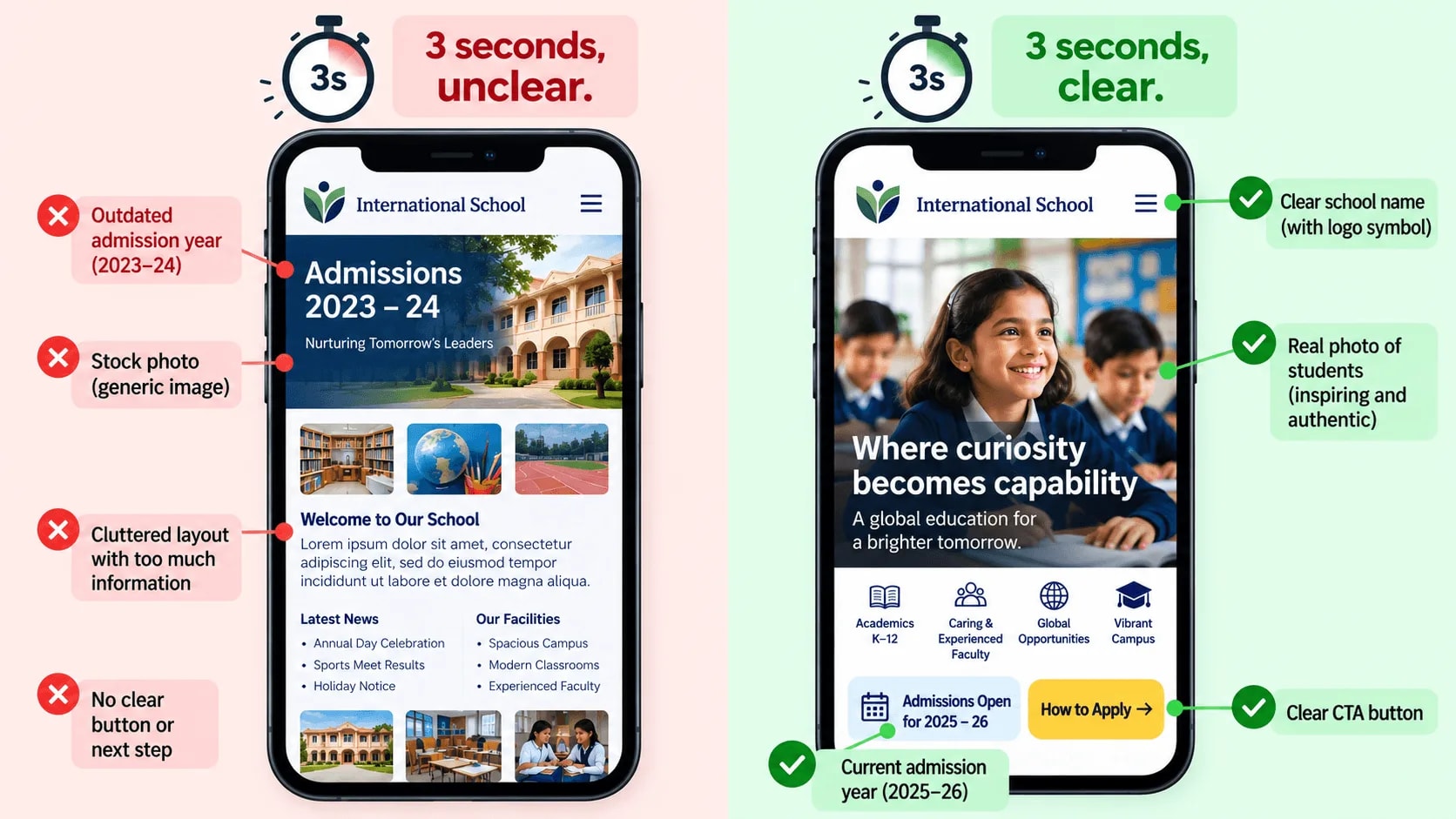
Many school homepages try to show everything at once: toppers, annual day, sports, infrastructure and the principal's message. The result is clutter, and clutter reads as complex and unfamiliar, which is exactly what the research warns against. It also makes the page heavy and slow, as the first two items in 13 School Website Mistakes That Quietly Cost You Admission Enquiries explain.
What works better:
- One strong hero image of real students in a real moment, with a clear headline. Use photos your school has consent to publish. Avoid stock photos, because parents often notice them.
- A few chosen photographs that tell one story each, such as a classroom, a lab or a playground. Put the rest on a gallery page.
- Short captions that say what is happening. "Science lab" is fine. "Grade 8 students testing water samples from the school garden" is better.
- Consistent colours and fonts across every page, so the site feels like one school rather than a collection of pages.
What quietly builds online credibility
Design creates the first impression. These details confirm it:
- Current content. An "Admissions 2023–24" banner in 2026 tells parents nobody is looking after the site.
- Visible contact details. Address, phone number and a map should be easy to find, not buried in the footer.
- Proof, not claims. Board affiliation, a recognition number or real results carry more weight than words like "world-class".
- A secure, working site. A browser warning about an expired certificate damages trust immediately.
- A good experience on mobile. Many parents will see your site on a phone first, so review it there first.
What this looked like on one school website
Some time after one school's site went live, the office told us they were having problems with enquiries. Parents were not finding what they were looking for.
The homepage hero was a still frame taken from a video, with no buttons on it. On desktop, the main menu sat behind a hamburger icon, a layout the school had chosen, and many parents never opened it.
We made a few small changes:
- Replaced the video still with a real photograph of the school.
- Gave the banner a clear heading and two buttons, Admissions and Apply Now.
- Added a short row of numbers just below the banner, such as how many years the school has been running and results it could stand behind.
- Moved the desktop menu out of the hamburger and into the top navigation bar.
None of this was a redesign. The school told us parents were finding things more easily and enquiries improved. I do not have figures to share, so take that as their experience rather than a measurement. It does match the research, though: the homepage became simpler to read at a glance, and more familiar.
A five-minute check
Open your homepage on your phone, on mobile data rather than office Wi-Fi. Look at it for three seconds, then close it. Ask yourself whether it looked like a real, active and well-run school.
Then do it again more slowly and note what you actually saw in those three seconds:
- Did the page load straight away, or did you see a blank screen or a loading spinner first?
- Could you tell what the school is and where it is, without scrolling?
- Did the photo show real students, or something that could belong to any school?
- Was anything out of date, such as an old admission banner, a past event or last year's dates?
- Was there an obvious next step, like "How to Apply" or "Book a Visit"? If parents tap it, the page behind it matters too, which What to Put on a School Admissions Page covers.
It also helps to ask someone outside the school, such as a friend, a relative or a new parent. You already know where everything is, so your own view is biased. A fresh pair of eyes notices what parents notice.
If you had to think about any of these, your website is probably making a weaker first impression than your campus does. The good news is that most of these fixes, like a better photo, an updated banner or a clearer button, cost attention more than money.
Sources
- Lindgaard, G. et al. (2006). Attention web designers: You have 50 milliseconds to make a good first impression! Behaviour & Information Technology. Summary via Search Engine Journal.
- Google Research. Users love simple and familiar designs: why websites need to make a great first impression.
- Fogg, B.J. et al., Stanford Persuasive Technology Lab. How Do People Evaluate a Web Site's Credibility? (2002, 46.1% figure).
- International Journal of Human-Computer Studies (2023). The effect of prototypicality on webpage aesthetics, usability, and trustworthiness.
Most of these fixes, like a better photo, an updated banner or a clearer button, cost attention more than money.
Frequently Asked Questions
